
Best Social Media Management Tools
This article at a glance
If you read this article, you run the risk of learning:
Best social media tools for small teams on a budget
Best social media tools for small teams that need reporting
Best social media tools for larger teams
Which social media tool should you choose?
The criteria
Download a comparison table with all the tools
How it all started

We were talking with a friend about bungee jumping, and her dad came up with some fatherly wisdom: "Doing something once is not enough. The real test is doing it a second time, because that's when you know what you're getting yourself into."
The conversation was about bungee jumping, but I think it applies more broadly - the second time really does give you clarity. She did jump twice in a row, just to make sure she knew exactly what she was signing up for, as per the said rule.
This is the approach I've taken with this research. I did it once for a company I used to work for, and now I'm doing it again to revisit my conclusions and see whether any new tools merit attention.
All of this was "inspired" by trying to keep Cosmonavt's own content moving consistently for over two months - and running headfirst into the pain of scheduling posts across multiple platforms that break down, crash, and ultimately fail to publish. Meta, I'm looking at you.
It was exactly the kind of experience that makes you ask a dangerous but necessary question: can't this be simpler?
So here I am. I've already collected the data - might as well do something useful with it. This time around, I went through over 40 tools, and ended up with 38 worth comparing across pricing, platform support, reporting, analytics, team collaboration, design workflow compatibility, social listening, and country of origin.
If you are a founder, marketing manager, or part of a small team trying to choose the right social media tool without wasting time and money, this should help.
This is not a paid article; I have researched the tools on my own initiative while looking for a tool for Cosmonavt.
The Tools
Adobe Express · Agorapulse · Apphi · Brand24 · Brandwatch · Buffer · Canva Planner · CoSchedule · eclincher · Hootsuite · HubSpot Social · Iconosquare · Kontentino · Later · Loomly · MavSocial · MeetEdgar · Meta Business Suite · Metricool · Missinglettr · OneUpApp · Planable · Postiz (self-host) · Publer · Sendible · Sked Social · Social Champ · SocialBee · SocialPilot · Sociamonials · Sprout Social · Storrito · Tailwind · Viraly · Vista Social · Zoho Social
Note on HubSpot Social: it only supports LinkedIn - it does not post to Instagram, Facebook, TikTok, YouTube, or Threads. It is primarily a CRM integration, not a full social media scheduler. Evaluate it only if your social strategy is LinkedIn-only and you are already using HubSpot as your CRM.
The Criteria

While researching, I started simple - which tool offers good value for money, is easy to work with and covers the channels I need. Later on, I expanded the channels to:
Instagram
Facebook
LinkedIn
TikTok
Threads
YouTube
Mastodon
Yeah, I left X out, and here's why.
Short version: we don't use it. Long version: it is overrun with bots, its AI is facing lawsuits over generating child sexual abuse material, and the platform is becoming increasingly locked down, hostile, and ethically compromised. Meanwhile, the German government has moved to Mastodon, and Todor - our resident CTO & open source advocate - has been making the case for more ethical technology choices for a while now. I’m listening. That is why X is out.
What is Mastodon, and why is it included in the channels?
Mastodon is a new type of social media that is open-source, has no algorithm, and doesn’t use your data.
But while researching, I kept on adding criteria and ended up with quite a long list. So here they are:
Pricing
Because the wrong tool can quietly become an expensive habit.
Scheduling and publishing
Because saving five minutes per post becomes meaningful very quickly when you want to have a full-on operation and keep it consistent.
Reporting and analytics
Because some teams just need a posting calendar, while others need white-label reports, benchmark data, or deeper performance tracking. My personal hell is collecting data from different platforms. It is also a huge waste of time if a tool can provide it.
Team collaboration
Important if more than one person is involved in content creation, approvals, publishing, or reporting.
Design workflow compatibility
Especially relevant if your team (like us) already works in Adobe Creative Cloud or Affinity.
Social listening
This one is new to me, but after testing Brand24, I think it can be very useful for a team to get a sense of their target audience and to monitor brand mentions, competitors, and broader industry conversations.
Country of origin
Lately, we have had many conversations internally that we should look further into European tech and see ways to support it, whether we should switch tools, and the ethics behind tech. The topic is growing in importance, and it’s shaping businesses like Cosmonavt. It is also worth considering if GDPR or procurement requirements matter to your business.
Instagram Story link stickers
The last criterion I added was whether the tool can autopost Instagram Stories with an interactive link. It turns out most of the tools don’t. Actually, out of 38, only three handle this without requiring a manual step on your phone: Meta Business Suite (free), Sked Social (from $49/mo annual), and Storrito ($19/mo per account). All others send a phone notification and require you to complete the posting manually. If Stories with links are a regular part of your content, this is a real decision point - not a footnote.
Why does the design workflow matter for us
Because we are a team of a designer and an animator, and already have access to Adobe Creative Cloud. If your team already uses Adobe Creative Cloud, then Adobe Express deserves more attention than it usually gets. Not because it is the most powerful scheduler in the comparison, but because it can reduce software sprawl and simplify the path from design to publishing.
The same logic increasingly applies to Affinity users, too. Since Canva acquired Affinity, the bridge between design and posting is becoming harder to ignore. If your team designs inside Affinity and exports to Canva, Canva’s scheduler may be enough for a simpler setup. This setup also works for small companies with some marketing efforts. Canva, with its basic scheduler, might be the tool that makes it easy for you to create and publish your posts.
That does not make either one the best tool overall. It just means the best tool is sometimes the one that removes one extra handoff from your process, and in the age of subscriptions, it is one less subscription you pay for. Keep in mind that Adobe Express supports Instagram, Facebook, LinkedIn, and TikTok - but not Threads, Mastodon, or YouTube. If those platforms are part of your content strategy, it is not a complete solution on its own.
Now we reach the tool comparison. I have grouped them by team size, pricing and reporting needs.
Best social media management tools by team type
Not every team should buy the same way.
A two-person studio does not need the same thing as a SaaS company with reporting requirements, multiple stakeholders, and attribution pressure. That is why the recommendations below are split by team type rather than just by features.
Metricool Starter
Best for: small teams on a budget
This is the strongest value pick for most small teams. It gives you a strong balance of affordability, analytics, competitor tracking, reporting, and multi-user access. It is one of the few tools that feels like a real upgrade from native posting without immediately pushing you into enterprise-level pricing. Metricool does not support Mastodon.
Buffer
Best for: small teams on a budget

Buffer supports scheduling to Facebook, Instagram, LinkedIn, Mastodon, and several other platforms. It offers a free plan, with paid scheduling starting at $5/month per channel - one of the most transparent pricing models in this entire comparison, since you only pay for what you actually connect.
The free plan lets you schedule up to 10 posts per channel at a time, which is enough for light use or to test the workflow before committing. The paid Essentials plan removes that cap entirely and adds advanced analytics, a hashtag manager, first comment scheduling, and custom video covers. The Team plan layers in content approval workflows and access levels - useful if more than one person is involved in publishing.
The analytics are honest rather than flashy: engagement breakdowns, best time-to-post suggestions, and post performance history. Not the deepest reporting in this comparison, but clean and easy to act on. If you need white-label reports or competitor benchmarking, you will want to pair it with a dedicated analytics tool.
Where Buffer genuinely stands out is in how little friction it creates. The interface is minimal, the scheduling queue is quick to use, and it simply does what it promises without burying features behind confusing menus. For a team that wants reliable, cross-platform scheduling without a steep learning curve, that is worth more than a longer feature list.
Personally, I prefer it over Metricool. For a few extra dollars a month, you get cleaner scheduling across more platforms, including Mastodon - and it stays out of your way while doing it.
Agorapulse
Best for: growing companies and mid-market teams that need more reporting
Disclaimer: I am a big fan of Agorapulse, so I am quite biased on the topic. Here are the reasons why:

It has a unified social inbox which consolidates all social media messages, comments, and reviews in one place, with an Inbox Assistant that can automatically categorise and route messages to the right team members. Its Best-in-class analytics and social ROI feature lets users measure the real business impact of their organic social media efforts, beyond just engagement metrics, integrating with Google Analytics and GA4.
It offers social listening through which you can track keywords, hashtags, and even specific locations to understand what people are saying, spot trends, and address issues before they escalate. They even added real-time alerts for crisis monitoring in 2025. It has multi-step approval workflows, which let you create step-by-step review chains that allow for team collaboration - great for agencies managing client approvals. The bulk publish feature lets you import a series of posts from a CSV file, an RSS feed, or a group of pictures to transform into posts. Conclusion: Agorapulse is a powerhouse for agencies and mid-sized teams who need deep engagement tools, reporting, and collaboration. It's just overkill (and pricey) if you mainly need simple scheduling - and as noted, it doesn't support Mastodon. For a solo user or small team, Buffer wins on value. For a growing agency, Agorapulse is hard to beat.
Sprout Social
Best for: teams that want premium reporting and can afford it
If reporting is the priority and the budget can handle it, Sprout Social is one of the strongest premium choices. It is polished, analytics-heavy, and more enterprise-ready than most teams actually need.
Brand24
Best for: teams focused on listening and brand intelligence
I am also a fan of Brand24, having had the chance to test it on one of our projects - tracking hashtags and monitoring how widely a piece of content was being reshared. The project was Automated Personalised Video Production at Scale for Sports Events - AVID, and it gave me a good sense of what the tool can actually do in a real campaign context.
It is a dedicated social listening tool, and a serious one. Brand24 monitors over 25 million sources in real time - social media, news sites, blogs, forums, podcasts, and review platforms - and surfaces mentions, hashtags, and brand signals as they happen. The AI layer goes beyond simple mention counting: it detects sentiment, identifies emotional tone, flags potential PR crises before they escalate, and scores the reach and influence of individual mentions. There is also a competitor benchmarking feature, so you can track Share of Voice relative to others in your space, and an influencer identification tool that highlights who is actually driving conversation around a topic.
Reporting is solid - exportable, clean, and useful for presenting listening data to clients or stakeholders without a lot of manual work.
One practical note: the trial period is short, so if you want to test it properly, start it at the beginning of a campaign when there is actually something to track.
Still can't decide?
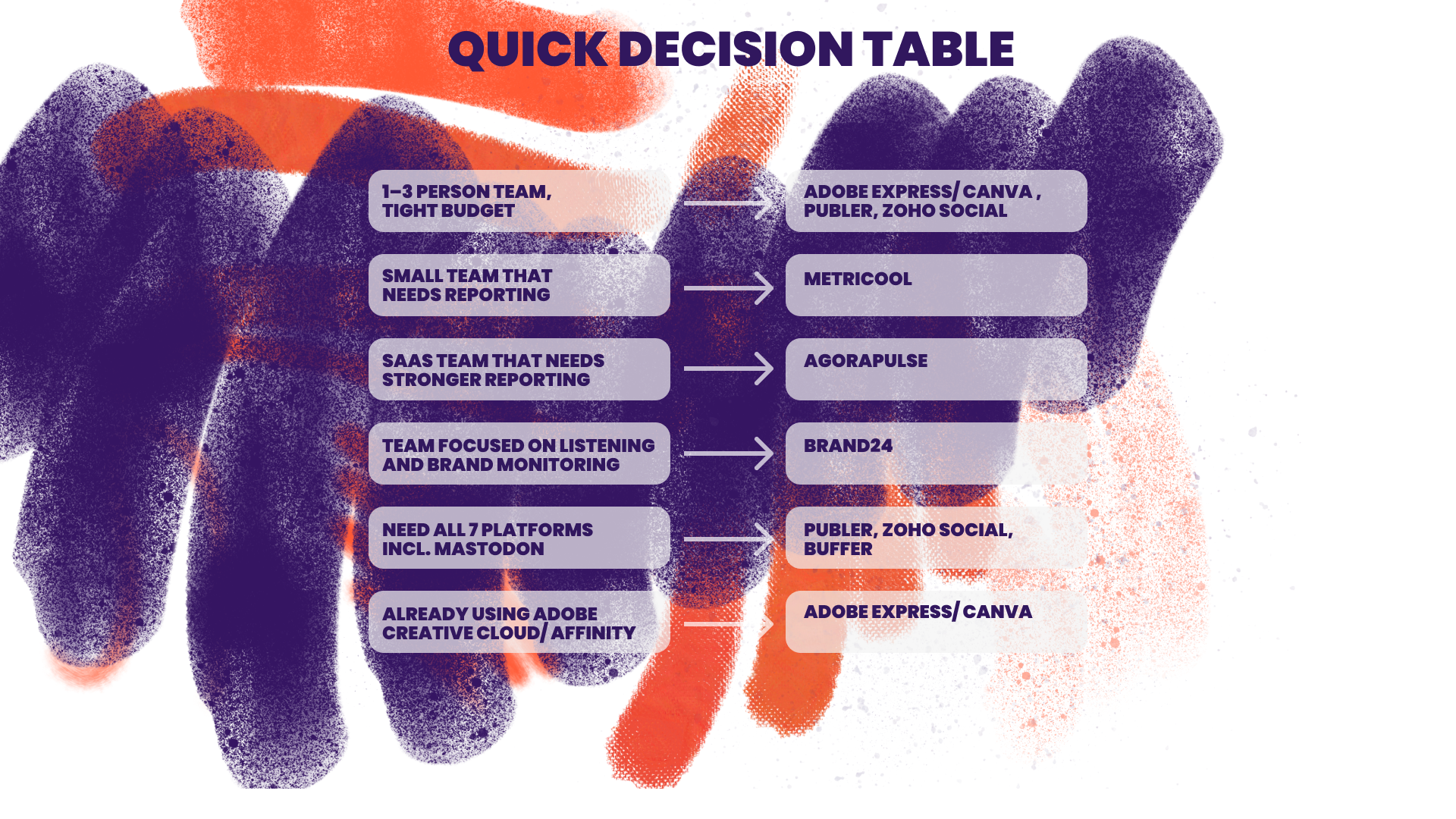
Picking the wrong tool means paying for features you don't need - or missing ones you do. I compared all 38 tools in one spreadsheet so you can filter, shortlist, and decide without the back and forth. Just drop your email, and it's yours.


About the author
Ivena Hlebarova is a brand designer and the co-founder of Cosmonavt. She is fond of great stories in any shape or form and is endlessly curious about how shapes, forms, and colours influence our perception and how to help brands communicate humanely with people.